
After patching two vIDM clusters with CSP-97577 (and addressing the known issues), I encountered an unexpected alert in SDDC Manager the following day:
“3 accounts have been disconnected. Visit Password Management page to take action.”
Clicking Manage took me to the Password Management page, where all three vIDM nodes were listed as disconnected.
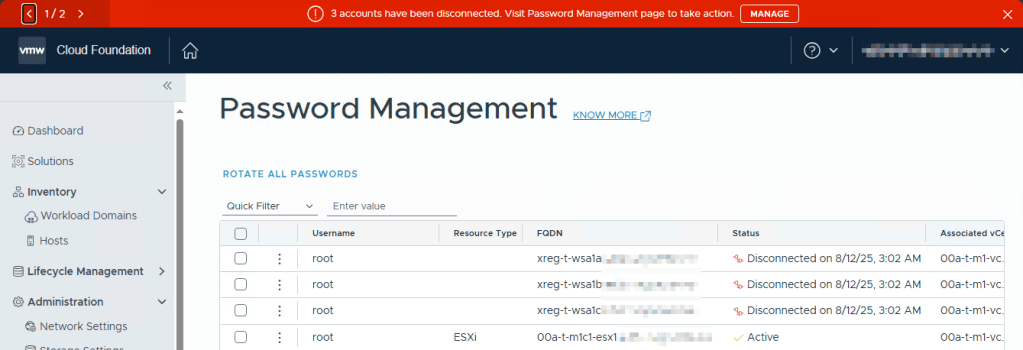
My first instinct was to reapply the root password to remediate the accounts, but remediation failed.
So what was going on?
🔍 Troubleshooting: SSH Working… But Not?
I confirmed the root password was correct, I could log into all nodes via SSH, even directly from the SDDC Manager. But when checking the failed task logs in SDDC Manager, I found this error:
“Failed to execute command, error: SSH: Failed to establish SSH session to <vIDM-node>”
So how could SSH fail for SDDC Manager if it worked for me?
That led me down the log rabbit hole. It turns out SDDC Manager uses JSch, a Java-based SSH client library with its own configuration, separate from openssh-client.
📄 Log Evidence: SSH Negotiation Failures
On the SDDC Manager, in /var/log/vmware/vcf/operationsmanager/operationsmanager.log, I found errors showing failed algorithm negotiation during SSH attempts:
2025-08-12T11:21:30.528+0000 DEBUG [vcf_om,689b23b91bbac9f741e29b15cd22332c,24f9] [c.v.v.p.u.c.AbstractPasswordChanger,om-exec-6] Remediation required: Performing test before remediation for username: root
2025-08-12T11:21:30.529+0000 DEBUG [vcf_om,689b23b91bbac9f741e29b15cd22332c,24f9] [c.v.v.p.u.c.SshPasswordChanger,om-exec-6] ssh password test started for xreg-t-wsa1a.<customer.domain>
2025-08-12T11:21:30.529+0000 DEBUG [vcf_om,689b23b91bbac9f741e29b15cd22332c,24f9] [c.v.v.p.u.c.SshPasswordChanger,om-exec-6] =====> Testing with actual account: root
2025-08-12T11:21:30.529+0000 DEBUG [vcf_om,689b23b91bbac9f741e29b15cd22332c,24f9] [c.v.v.p.h.LinuxHostHelperService,om-exec-6] Attempting to connect to host : xreg-t-wsa1a.<customer.domain>, using username : root
2025-08-12T11:21:30.610+0000 DEBUG [vcf_om,689b23b91bbac9f741e29b15cd22332c,24f9] [c.v.v.s.c.s.SecurityConfigurationServiceImpl,om-exec-6] Security config retrieved {"fipsMode":false}
2025-08-12T11:21:30.747+0000 ERROR [vcf_om,689b23b91bbac9f741e29b15cd22332c,24f9] [c.v.evo.sddc.common.util.SshUtil,om-exec-6] Unable to create jsch CLI session:
com.jcraft.jsch.JSchException: Algorithm negotiation fail
        at com.jcraft.jsch.Session.receive_kexinit(Session.java:590)
        ...
        at java.base/java.lang.Thread.run(Thread.java:840)
2025-08-12T11:21:30.748+0000 ERROR [vcf_om,689b23b91bbac9f741e29b15cd22332c,24f9] [c.v.e.s.c.u.c.SshCommandExecuter,om-exec-6] Could not connect to the SSH server @ xreg-t-wsa1a.<customer.domain> for configuration.
com.jcraft.jsch.JSchException: Algorithm negotiation fail
        at com.jcraft.jsch.Session.receive_kexinit(Session.java:590)
        ...
        at java.base/java.lang.Thread.run(Thread.java:840)
2025-08-12T11:21:30.749+0000 ERROR [vcf_om,689b23b91bbac9f741e29b15cd22332c,24f9] [c.v.v.p.h.LinuxHostHelperService,om-exec-6] Exception when testing host credentials
com.vmware.evo.sddc.common.util.command.CommandExecuterException: SSH: Failed to establish SSH session to xreg-t-wsa1a.<customer.domain>
        at com.vmware.evo.sddc.common.util.command.SshCommandExecuter.<init>(SshCommandExecuter.java:64)
        ...
        at java.base/java.lang.Thread.run(Thread.java:840)
Caused by: com.jcraft.jsch.JSchException: Algorithm negotiation fail
        at com.jcraft.jsch.Session.receive_kexinit(Session.java:590)
        ... 27 common frames omitted
On the vIDM nodes, /var/log/auth.log confirmed the connection attempts, but none succeeded:
2025-08-07T01:02:07.755480+00:00 xreg-t-wsa1c sshd[2341798]: Unable to negotiate with 10.y.z.140 port 59042: no matching host key type found. Their offer: ssh-rsa,ssh-dss,ecdsa-sha2-nistp256,ecdsa-sha2-nistp384,ecdsa-sha2-nistp521 [preauth]
2025-08-08T01:02:06.454396+00:00 xreg-t-wsa1c sshd[2616656]: Unable to negotiate with 10.y.z.140 port 59186: no matching host key type found. Their offer: ssh-rsa,ssh-dss,ecdsa-sha2-nistp256,ecdsa-sha2-nistp384,ecdsa-sha2-nistp521 [preauth]
...
2025-08-12T11:21:30.736156+00:00 xreg-t-wsa1a sshd[2361156]: Unable to negotiate with 10.y.z.140 port 55458: no matching host key type found. Their offer: ssh-rsa,ssh-dss,ecdsa-sha2-nistp256,ecdsa-sha2-nistp384,ecdsa-sha2-nistp521 [preauth]
The key point: SDDC Manager was trying to use ssh-rsa, ssh-dss, and various ecdsa-sha2 algorithms, but vIDM wasn’t offering any of them.
🧪 Root Cause: HostKey/HostKeyAlgorithms Restriction
Inspecting /etc/ssh/sshd_config on the vIDM nodes revealed this (relevant config to our problem):
HostKey /etc/ssh/ssh_host_rsa_key
#HostKey /etc/ssh/ssh_host_ecdsa_key
#HostKey /etc/ssh/ssh_host_ed25519_key
...
HostkeyAlgorithms -ssh-rsa
This effectively disables ssh-rsa, leaving no matching host key algorithm that SDDC Manager trusts.
I also checked all four known_hosts files on SDDC Manager:
/root/.ssh/known_hosts/etc/vmware/vcf/commonsvcs/known_hosts/home/vcf/.ssh/known_hosts/opt/vmware/vcf/commonsvcs/defaults/hosts/known_hosts
Each file only referenced ssh-rsa host keys for our vIDM nodes, now somehow not accepted by our nodes. Why? I don’t exactly know, if you do, leave a comment.
These vIDM clusters were first installed during the customers VCF 4.0 greenfield installation, which at the time was vIDM v3.3.2, and has subsequently been updated and patched step by step during this time until it’s now on 3.3.7 with CSP-97577 with VCF 5.2.1.2.
There are at least a couple of solutions for our problem.
🛠️ Two Solutions
⚡ Quick Fix (Not Recommended):
Re-enable ssh-rsa on vIDM nodes:
- Edit
/etc/ssh/sshd_config, update last line so it says:HostkeyAlgorithms ssh-rsa - Restart SSH:
systemctl restart sshd
But this reintroduces a (apparantly) deprecated algorithm. So let’s just do it right.
✅ Recommended Fix: Use Stronger Algorithms and Re-Trust Host Keys
1. Reconfigure SSH on vIDM Nodes
Edit /etc/ssh/sshd_config so it reads as follows for our specific configuration lines:
#HostKey /etc/ssh/ssh_host_rsa_key
HostKey /etc/ssh/ssh_host_ecdsa_key
HostKey /etc/ssh/ssh_host_ed25519_key
...
HostkeyAlgorithms -ssh-rsa
Restart SSH:
systemctl restart sshd2. Re-Trust Host Keys in SDDC Manager
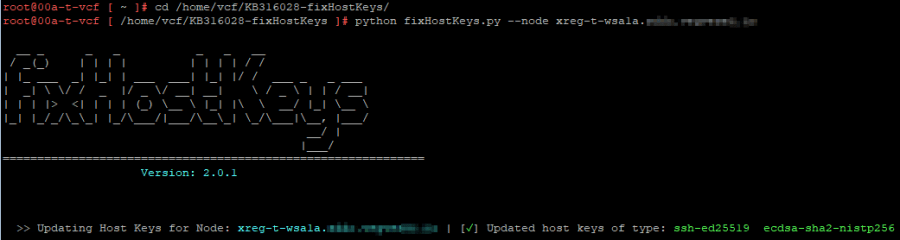
Follow KB 316028 and download the fixHostKeys.py script. Store it on the SDDC Manager and run (after you take a VM snapshot):
python fixHostKeys.py --node <vIDM-FQDN>
Repeat this command for each vIDM node FQDN. This updates the known_hosts files to trust the new ed25519 and ecdsa host keys, and should result in a pretty ascii output:
Verify with:
cat /root/.ssh/known_hosts | grep <vidm-hostname>
You should now see ssh-ed25519 and ecdsa-sha2-nistp256 entries only.
🔄 Final Steps
You can wait for SDDC Manager’s daily password check, or manually trigger remediation for each vIDM node. Enter the existing root password, it should validate within 30 seconds. Repeat for all vIDM nodes that are disconnected.
🧵 Summary
| Solution | Description | Recommended |
|---|---|---|
| Re-enable ssh-rsa | Quick workaround, restores compatibility but uses older/slower algorithms | ❌ No |
| Use ed25519/ecdsa + re-trust | Proper fix aligning with modern security standards | ✅ Yes |
 VMnic
VMnic 