A blog space about virtualization, SDDC and infrastructure with a dash of homelab stuff
Snapshot Fails on Windows VM with SQL Server
When taking a snapshot of a Windows VM running SQL Server, either manually or triggered by backup software, you may encounter the following error:
“An error occurred while quiescing the virtual machine. See the virtual machine’s event log for details. An error occurred while taking a snapshot: Failed to quiesce the virtual machine. An error occurred while saving the snapshot: Failed to quiesce the virtual machine.”
🔍 Symptoms
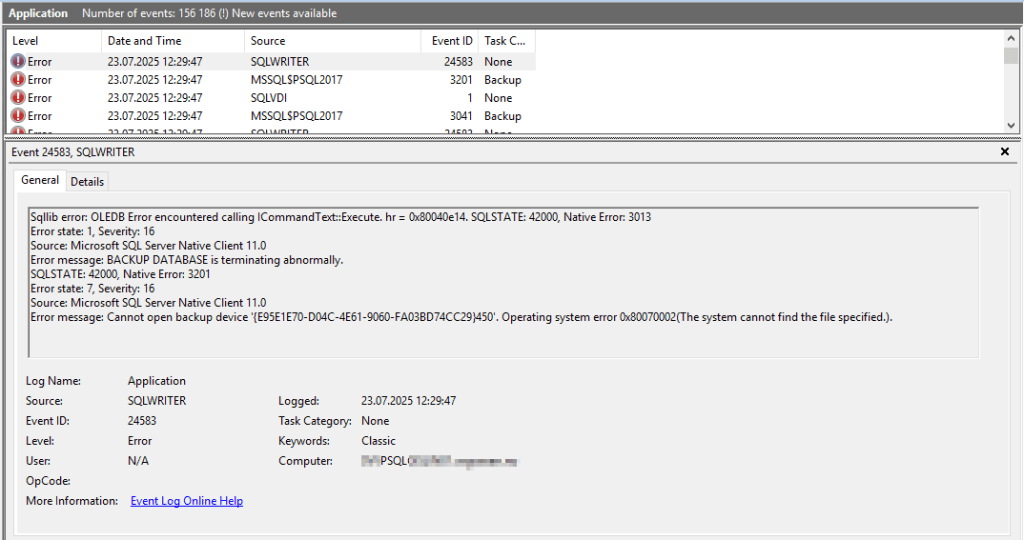
If you’re hitting this error during snapshot operations, especially with SQL Server present, you’ll likely find multiple SQL-related errors in Event Viewer, such as:
## SQLWRITER

Sqllib error: OLEDB Error encountered calling ICommandText::Execute. hr = 0x80040e14. SQLSTATE: 42000, Native Error: 3013
Error state: 1, Severity: 16
Source: Microsoft SQL Server Native Client 11.0
Error message: BACKUP DATABASE is terminating abnormally.
SQLSTATE: 42000, Native Error: 3201
Error state: 7, Severity: 16
Source: Microsoft SQL Server Native Client 11.0
Error message: Cannot open backup device '{E95E1E70-D04C-4E61-9060-FA03BD74CC29}450'. Operating system error 0x80070002(The system cannot find the file specified.).
## SQLVDI

SQLVDI: Loc=SVDS::Open. Desc=Open(Control). ErrorCode=(2)The system cannot find the file specified.
. Process=2204. Thread=10636. Server. Instance=PSQL2017. VD=Global{E95E1E70-D04C-4E61-9060-FA03BD74CC29}440_SQLVDIMemoryName_0.
## MSSQL<INSTANCENAME>

Cannot open backup device '{E95E1E70-D04C-4E61-9060-FA03BD74CC29}440'. Operating system error 0x80070002(The system cannot find the file specified.).
Additionally, running ‘vssadmin list writers‘ in powershell (as an administrator) will often reveal that the SqlServerWriter is in a failed state:
Before diving deeper, ensure these common causes are ruled out:
✅ There is sufficient free disk space on all drives
✅ The VMware Tools service is running
✅ The VMware Snapshot Provider service is installed (startup type is usually manual)
✅ The SQL Writer service is running (try restarting it)
In my case, none of these resolved the issue.
🎯 Root Cause in This Case
Working with the customer’s SQL DBAs, we found alerts in the SQL Server logs stating:
“Cannot create worker thread.”
The affected VM had:
Only 2 vCPUs
Over 400 databases
SQL Server 2017, which by default supports up to 512 worker threads for 4vCPUs or less (documentation)
Given the workload, the SQL instance had likely exhausted its available worker threads, including those required for VSS-based snapshot operations (my guess).
✅ Resolution
The DBA increased the maximum worker threads from the default (dynamic) setting to a fixed value of 1024. This allowed SQL Server to handle the additional threading requirements during quiescing, and:
✅ Snapshotting worked successfully again.
📌 Final Notes
This issue might not be common in smaller environments, but on SQL-heavy systems with many databases and limited vCPU, worker thread exhaustion can silently break snapshot functionality. If you’ve ruled out the usual suspects and see VSS/SQL errors, check the SQL Server logs and validate the worker thread usage.
 VMnic
VMnic 