For over a week, I’ve been trying to figure out why my trusted ShareX screenshot workflow suddenly broke. Every time I hit the Print Screen key combination I prefer, I’d see the familiar screen flash — but nothing else happened. No editor, no prompt. It turns out the culprit was Logitech Options+, which had quietly taken over the Print Screen key and set it to save screenshots directly to a file and put the fullscreen screenshot on the clipboard.
No warning, no prompt, just a silent override of my existing configuration. It’s a frustrating example of software assuming control without consent, especially when it disrupts productivity tools you rely on daily. Below is the setting that caused it — in case you’re also wondering where your screenshots went.
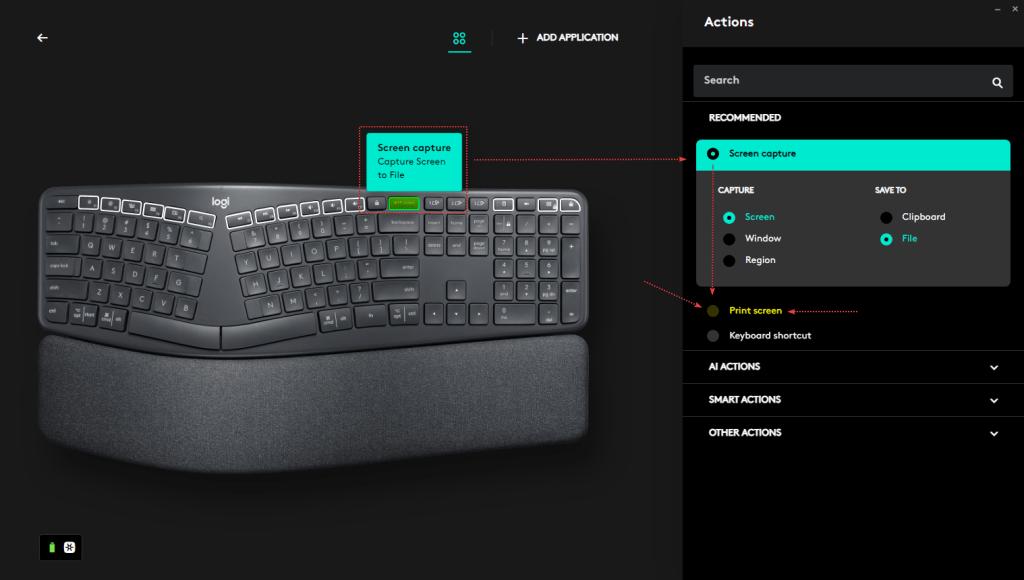
By changing the “recommended” setting back to “Print screen” (see above) I was able to restore my ShareX Print Screen Key combination.
 VMnic
VMnic 