During a bring-up of a small VCF 5.0 test-environment for a customer, with 4 hosts for MGMT-WLD and 4 hosts for VI-WLD, I hit a snag when creating the VI workload domain from SDDC Manager. The subtask “Validate Workload Domain Deployment Specification” failed.
If you’re not interesting in going through some digging with me, you can skip down to the bottom and see the explaination/solution.
As usual, there is too little information about what failed in the task list. You primarily get a token code to search for in the logs, and which logs are that? And are there other places to get more useful info?
Digging through logs
The best starting point for logs in SDDC Manager is /var/log/vmware/vcf/.
This directory contains the following sub directories:ceip commonsvcs domainmanager lcm operationsmanager sddc-manager-ui-app sddc-support
For this particular case, it’s the domainmanager folder that keeps the logs for WLD creation etc. As long as your failed task is from “today” you can search (less/cat/grep) the domainmanager.log file. If you are troubleshooting the failed task from another day you will have to locate the rotated log and search that one (zless/zcat+grep). Example log name: domainmanager.2023-10-05.0.log.gz
Ok, so we have a error token and when you search you probably find one line which contains the token. Example:
root@test-vcf [ /var/log/vmware/vcf/domainmanager ]# cat domainmanager.log | grep 257DQB
2023-10-06T07:16:08.125+0000 ERROR [vcf_dm,27040e3ed2a94c40,47f7] [c.v.e.s.o.model.error.ErrorFactory,dm-exec-8]  [257DQB] PUBLIC_DOMAINSPEC_VALIDATION_FAILED Failed to validate domain spec
If you use a command like less and check the file, searching (hit ‘/’ and type the token) you can find some extra information, but as you would see, still not too informative:
2023-10-06T07:16:08.120+0000 ERROR [vcf_dm,27040e3ed2a94c40,47f7] [c.v.v.v.f.a.ValidateDomainSpecAction,dm-exec-8]  Domain Spec validation failed with errors [LICENSE_INSUFFICIENT_CAPACITY]
2023-10-06T07:16:08.120+0000 WARN  [vcf_dm,0000000000000000,0000] [c.v.v.v.c.h.i.HttpConfigurationCompilerBase$ConnectionMonitorThreadBase,VLSI-client-connection-monitor-174]  Interrupted, no more connection pool cleanups will be performed.
2023-10-06T07:16:08.125+0000 ERROR [vcf_dm,27040e3ed2a94c40,47f7] [c.v.e.s.o.model.error.ErrorFactory,dm-exec-8]  [257DQB] PUBLIC_DOMAINSPEC_VALIDATION_FAILED Failed to validate domain spec com.vmware.evo.sddc.common.core.error.CompositeInvalidInputException: Failed to validate domain spec
        at com.vmware.vcf.vimanager.fsm.actions.ValidateDomainSpecAction.execute(ValidateDomainSpecAction.java:61)
        at com.vmware.vcf.vimanager.fsm.actions.ValidateDomainSpecAction.execute(ValidateDomainSpecAction.java:29)
        at com.vmware.evo.sddc.orchestrator.platform.action.FsmActionState.invoke(FsmActionState.java:62)
        at com.vmware.evo.sddc.orchestrator.platform.action.FsmActionPlugin.invoke(FsmActionPlugin.java:159)
        at com.vmware.evo.sddc.orchestrator.platform.action.FsmActionPlugin.invoke(FsmActionPlugin.java:144)
You will find your token on line 3, and it says:PUBLIC_DOMAINSPEC_VALIDATION_FAILED Failed to validate domain spec
On line 1 though (where I cut the excerpt of the log output) you can actually see some useful information to work on:Domain Spec validation failed with errors [LICENSE_INSUFFICIENT_CAPACITY]
So SDDC Manager is actually trying to validate your licenses? But which license?
Lets see if we can dig out some more info – lets check the failed subtask via API.
Checking the failed subtask status via API
The tasks SDDC Manager kicks off all have an ID. If you click on the task, you will see all the subtask, and in the address field in your browser you can see this task ID, like this:

Grab this last part (dc16d621-2a6a-4084-a1a9-0023686a719d) and head over to the API Explorer in Development Center (last link in the left meny column).
Please note that all API calls executed from here are done against your live environment. As long as you only execute GET calls, you don’t change anything. We will execute a GET to get the task information for ID dc16d621-2a6a-4084-a1a9-0023686a719d
SDDC Manager > Developer Center > API Explorer > Tasks > (expand) GET /v1/tasks/{id}
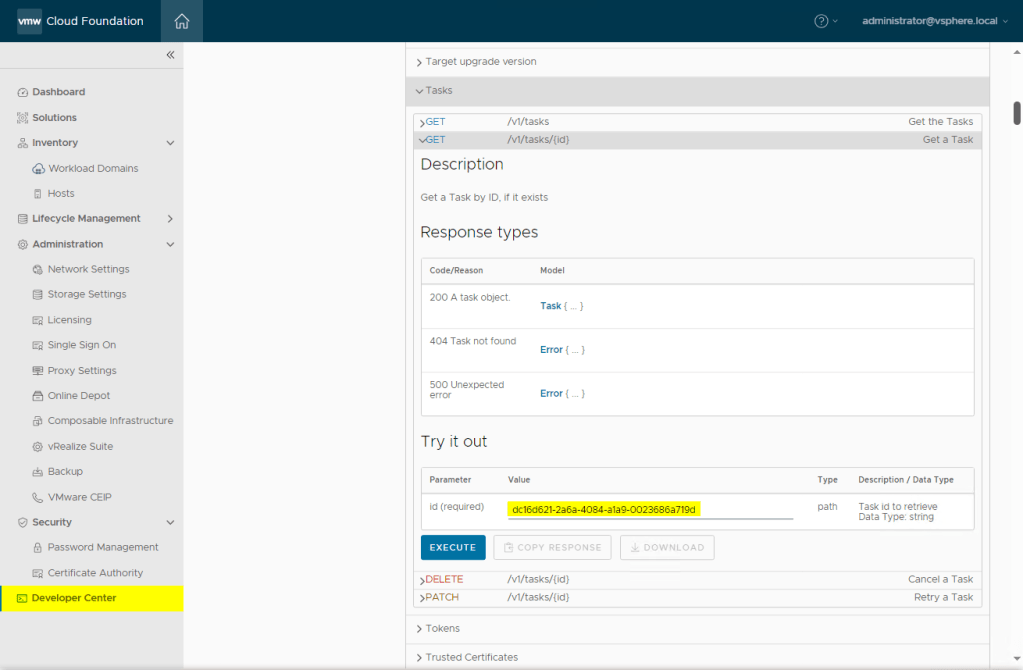
Paste the ID into the parameter like you see on the screenshot above and click Execute. This is a GET call, so it won’t harm the system in any way. You will then see a Response section under the execute button, which is clickable. It might take a few seconds to display the result, and if you scroll down a bit you will see a list of subTasks you can dive into the same way. Luckily they are well named, so find the failed task and click it, or click the copy icon ( ) and paste the result into notepad.
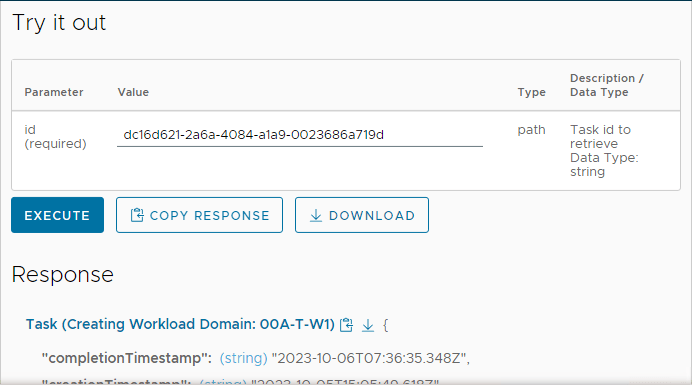
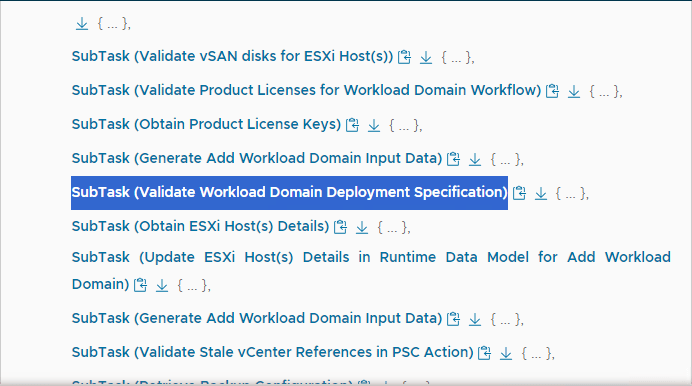
Click on the subtask to see the information. You should then see something like this:
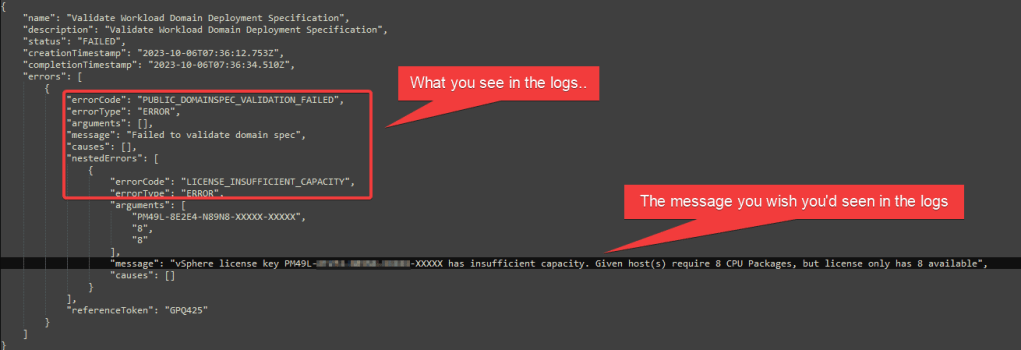
So now we know actually which license it’s complaining about. And strangely enough, it complains about having enough licenses !?!:
Given host(s) require 8 CPU Packages, but license only has 8 available
That’s quite strange. We do have enough licenses after all.
After digging a bit around, I finally found a VMware KB94451 – “Workload domain creation fails with insufficient license capacity”.
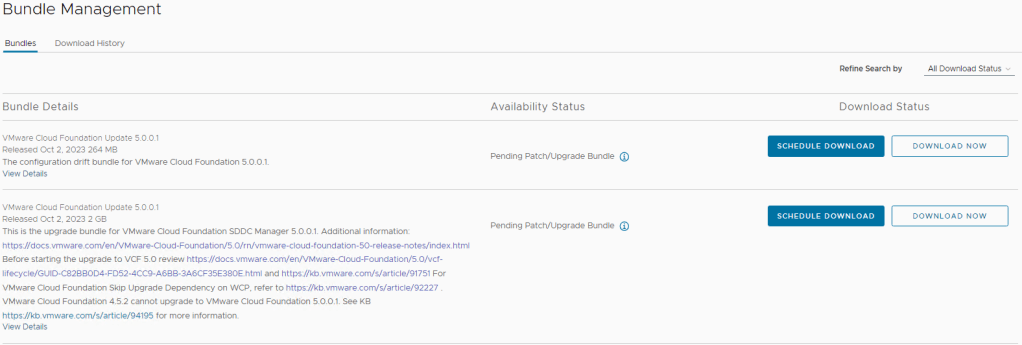
It states “Wrong validation in the code which doubles the requirement for a vSphere license or vCenter license” and it is fixed in SDDC Manager v5.0.0.1.
It also suggest a few workarounds, like adding more licenses temporarily, and while that works (I did that), I would recommend just to take a snapshot of SDDC Manager and run the upgrade.
 VMnic
VMnic 