During an VCF 4.5 upgrade, the vCenter was upgraded to 7U3h (and NSX-T to 3.2.1.2 before that). After the upgrade we saw a strange alert in NSX-T:
“Edge VM Present In NSX Inventory Not Present In vCenter“
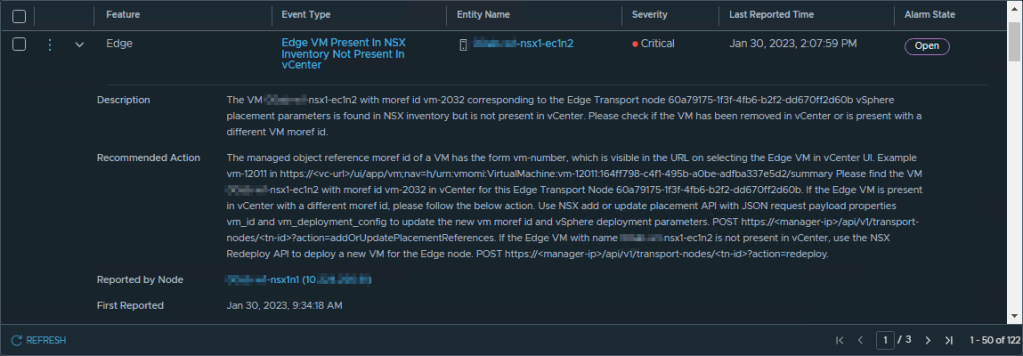
Following the recommended action, we found the Edge VMs to have the same correct vm-#### and ID as expected, but NSX still complained. So it seems like a false alert in our case. What we did to fix this was force NSX to read the resource reservation settings from vCenter for each node:
NSX-T > System > Fabric > Nodes > Edge Transport Nodes
Select edge node with alert, click Actions, and then ‘Change Edge VM Resource Reservations”. It will use a couple of seconds to load, and show the window for changing the reservations. Click Cancel.
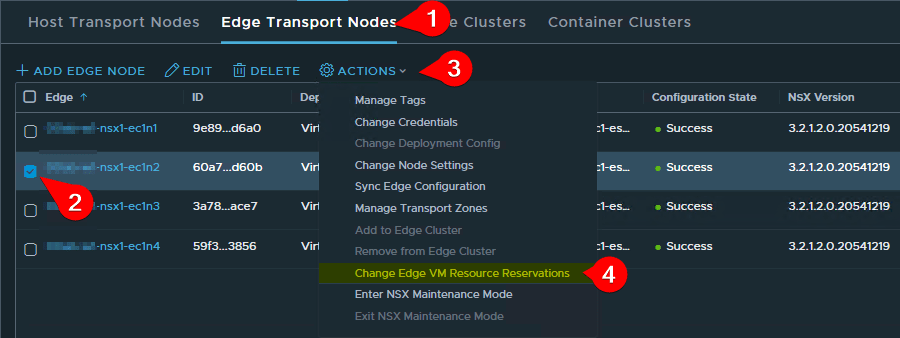
For me, the alarm was now gone.
 VMnic
VMnic 